

pebble 
pebble@critters.gay
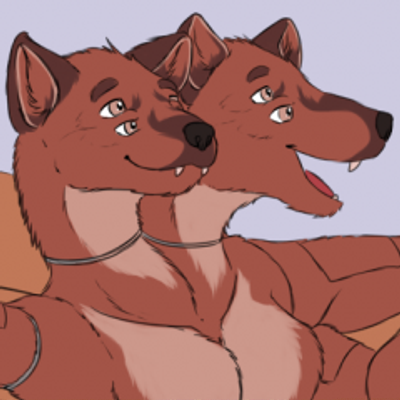
i made this to use as a pfp but i couldn’t find a way to export it as an animated image smaller than a MB ; ;
 3
3
 0
0
 1
1
the Hearth 
Hearth@plush.city
@pebble i think that would be down to how infrequent the ear wiggles are, compared to the other motions in it
-F
1
0
0
pebble
pebble@critters.gay
@Hearth it’s 100% that bc the rest of the animation repeats 4 times for 1 ear flick, but i need the ear flicks :(
1
0
0
the Hearth
Hearth@plush.city
@pebble pebble you're exceptionally cute
and that's a very pettable snout
-F
1
0
0


bluestarultor
bluestarultor@tech.lgbt@pebble I was going to suggest .APNG, but then I remembered Fedi doesn't handle it. Which is a shame, because you have a bunch of really good solid color fields to work with that would allow PNG compression to do its thing nicely, I think.
0
0
0
the Hearth
Hearth@plush.city
@pebble Oh I definitely understand! You could maybe make them more frequent?
GIF is not a format designed for different things repeating at different rates, unfortunately
-F
0
0
0


pebble
pebble@critters.gay
@twinkle kjhd omg !! this is so helpful thank u !!
would it be difficult to make an optimized gif like this from a sequence of PNGs? bc this was originally rendered with a transparent background which mp4 doesn’t support
1
0
1





pebble
pebble@critters.gay
@twinkle idk what you did differently but with the exact same parameters (except framerate being 25 instead of 30) the webp ends up being 1.7MB while the gif ends up being 2.3MB :/ maybe it’s the transparency?
1
0
1
pebble
pebble@critters.gay
@twinkle https://f.pebb.in/frames-11kmyDkn.zip here u go ! no pressure though don’t feel like u have to
1
0
1
🩷 Stella
twinkle@pebble ah, well, as i’m beginning to find out, it is very hard to optimize gifs with transparency because gif optimisation heavily relies on not discarding the previous frame (because gif has very basic tools for “only discard pixels in this rectangle please”). ive done everything i can to squeeze it while not losing too much quality. here’s 160x160@25fps for around 1MB
and the commands:
ffmpeg -framerate 25 -i ./frames/%04d.png -c:v libvpx-vp9 -filter_complex "[0]lutrgb=a=val+val*maxval" -crf 15 -b:v 0 -pix_fmt gbrap -strict experimental ./a.webm -y
ffmpeg -c:v libvpx-vp9 -i a.webm ./new-frames/%04d.png -y
gifski ./new-frames/*.png -o a.gif -W 160 -H 160 --fps 25 --repeat 0 -Q 50 --extra
 1
0
0
1
0
0
🩷 Stella
twinkle@pebble literally the 2 ffmpeg commands just do the following 2 things:
- slightly reduce quality by converting it to vp9 (vp9 might have something better to say about quantising the colours :P)
- replace all alpha that’s not 0 to 255 i.e. remove all semi-transparent pixels. this just helps gifski
1
0
0
pebble
pebble@critters.gay
@twinkle that makes sense.. thanks a lot for helping out with this !! i really appreciate it
0
0
1



Jennifer! 💛
yellow@twoot.site@pebble try using https://ezgif.com/optimize and messing around with settings to get basically the same quality, with way less space! :3
1
0
0
Jennifer! 💛
yellow@twoot.site@pebble this is an .mp4, or I would've done it and sent it to you eheh :3
1
0
0
pebble
pebble@critters.gay
@yellow ezgif is super useful!! it’s what i normally use to make gifs, but unfortunately it’s limited to 25fps, and even then it couldn’t do enough with this, i think there’s just too much to compress
0
0
0